
Is your trading robot really running right now?
A Windows update at 3 a.m., MetaTrader 5 closing, a lost broker connection… and your robot stops without anyone noticing. CCNT Supervision checks your Windows VPS every minute, restarts MetaTrader 5 and warns you immediately.
- 100% self-service install, in 2 minutes
- Checked every minute, 24/7
- Automatic MetaTrader 5 restart
- E-mail, Telegram and WhatsApp alerts
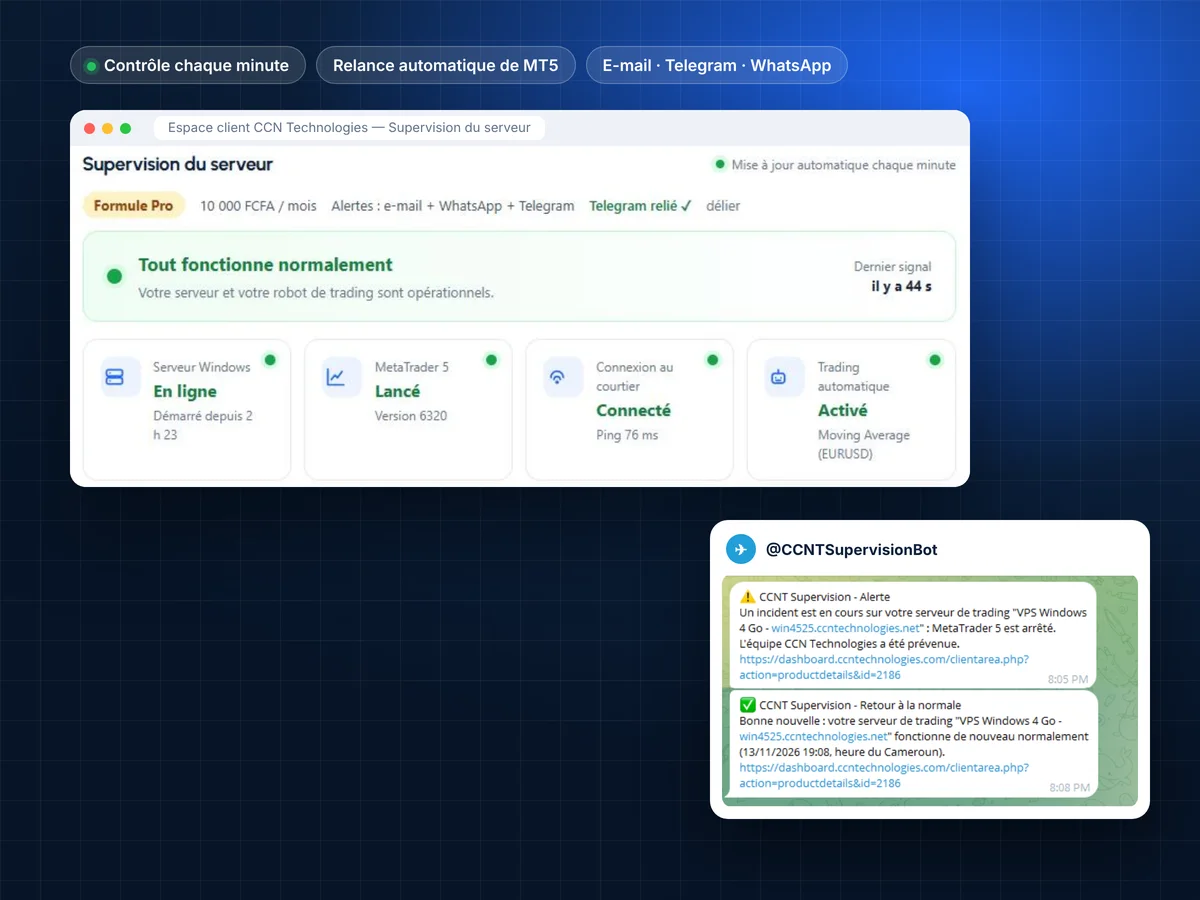
How many trades did your robot miss this week?
A trading VPS can fail in a thousand silent ways. Without monitoring, you find out too late.
Did your robot run last night?
A Windows update reboots the VPS at night: MetaTrader 5 does not restart on its own and your robot stays stopped until you next log in.
Are you still connected to your broker?
MetaTrader 5 stays open but the connection is lost: no red light on your phone, and no order goes out.
Is algorithmic trading still enabled?
One click too many or an update, and Algo Trading switches off: the robot is attached but no longer trades.
Is your VPS overloaded?
CPU at 100%, memory or disk almost full: the server slows down and MetaTrader 5 may freeze.
Did MetaTrader 5 restart after its update?
MT5 updates itself and restarts: it then has to reconnect and restart your robot.
How long before you notice?
Most of the time, the outage is discovered hours later, when opening Remote Desktop… after the market has moved.
CCNT Supervision promises no trading gains: it checks that your server and MetaTrader 5 are working, restarts what can be restarted and warns you as soon as something is wrong.
100% self-service: three steps, and your robot is never alone again
Tested in real conditions on a CCN Windows VPS: reboots, updates, MetaTrader 5 stops and alerts on every channel.
Install it yourself in 2 minutes
Is your VPS ready? Download your personal installer from the client area and run it: everything is automated. No intervention from CCN Technologies, no access to your server.
Checked every minute
A signed Windows agent and the CCN_Supervision service in MetaTrader 5 report the technical status: server, MetaTrader 5, broker connection and automated trading.
Restart and alerts
MetaTrader 5 stopped? It is restarted automatically. Incident lasting more than 3 minutes? You are alerted, then told when things are back to normal.
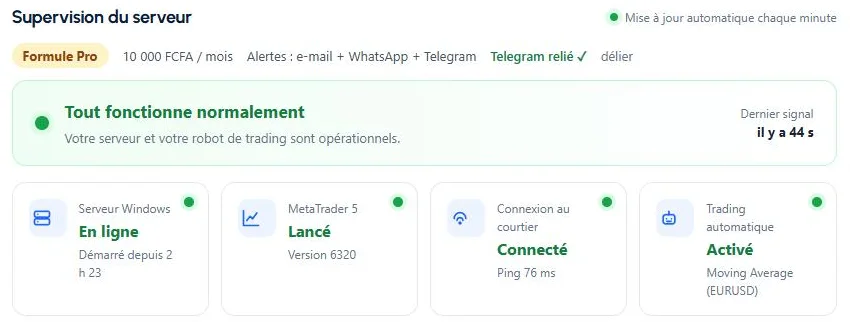
Everything that can stop your robot, checked every minute
Windows server online
A signal every minute; with no signal for 5 minutes, the server is marked offline and you are warned.
MetaTrader 5 running
Stop detection and automatic restart, up to 3 times per hour.
Broker connection
Connected or not, with the response time (ping) in milliseconds.
Automated trading and robots
Algo Trading enabled, robots attached to charts and allowed by the broker.
Server resources
CPU, memory and disk, with a 24-hour chart; overload reported.
Updates and reboots
Pending Windows updates, reboot detected, session opened and MT5 restarted automatically.
Instant alerts
E-mail and Telegram, plus WhatsApp on the Pro plan: incident, then back to normal.
History and availability
Robot availability over 30 days, 6-month event history, CSV export.
Warned on your phone, wherever you are
As soon as an incident lasts more than 3 minutes, the alert goes out; once everything is running again, you get “Back to normal”. Link your Telegram in one click from the client area.
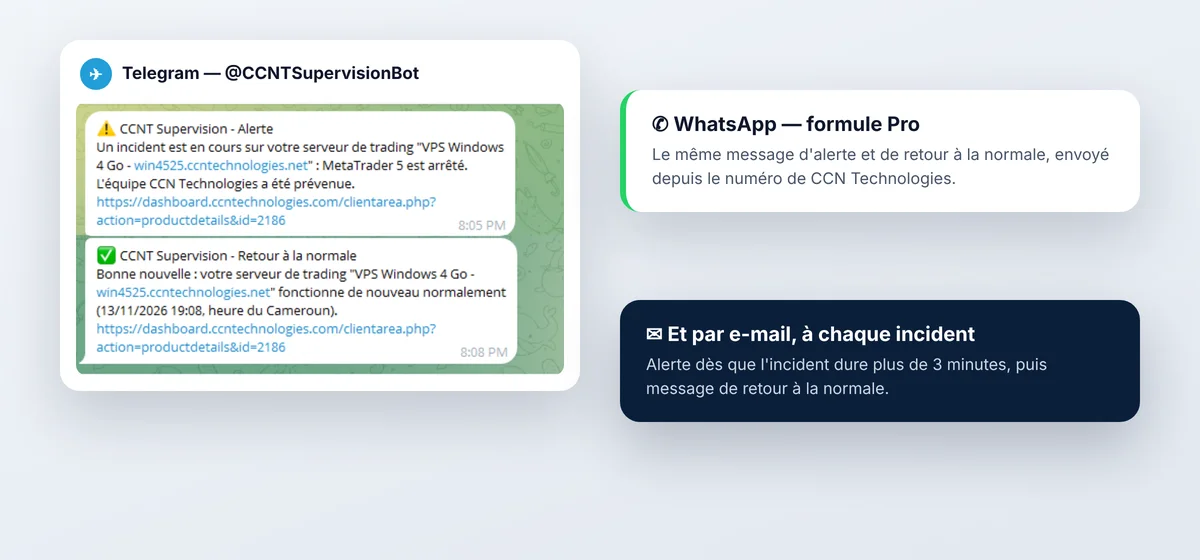
A trading VPS without monitoring, or with CCNT Supervision
| Without monitoring | With CCNT Supervision | |
|---|---|---|
| Windows update at night | MetaTrader 5 stays closed until you log in | Session opened and MetaTrader 5 restarted automatically |
| MetaTrader 5 closes | Found out hours later | Automatic restart within 1 to 2 minutes |
| Broker disconnected | No alert | E-mail and Telegram alert, WhatsApp on Pro |
| Algo Trading disabled | Robot stops trading, no visible sign | Incident shown in your client area |
| Overloaded VPS | Unexplained slowdowns | CPU, memory and disk tracked continuously |
| History | No record | 6-month events and 30-day availability |
Choose your peace of mind
Monthly option for your CCN Technologies Windows VPS. Prices in FCFA, payable by Mobile Money and our other payment methods.
CCNT Supervision Essential
- Real-time dashboard in the client area
- Server and MetaTrader 5 checked every minute
- Automatic MetaTrader 5 restart
- Session and MT5 restarted after a Windows reboot
- E-mail and Telegram alerts
- 6-month history and CSV export
CCNT Supervision Pro
- Everything in Essential
- WhatsApp alerts to the number already saved in your client area
- Team intervention within 1 hour if the module has a technical problem*
- 99% availability commitment*
Installation and use are fully self-service: CCN Technologies does not take part in the installation. * The 1-hour intervention, from 8 a.m. to 10 p.m. (Cameroon time), covers the operation of CCNT Supervision itself (agent, MetaTrader 5 service, alerts); if it requires access to your server, you will be asked to entrust it temporarily. From 10 p.m. to 8 a.m., monitoring, automatic restart and alerts continue; the team resumes at 8 a.m. Availability commitment under the Pro plan terms. CCNT Supervision is an option of CCN Technologies Windows VPS.
Your money and your access stay yours
- CCNT Supervision only checks the technical operation of your server and MetaTrader 5.
- Your Windows passwords and trading credentials stay in Windows and MetaTrader 5: they are never read, stored or sent to CCN Technologies.
- Sharing your trading account information (balance, positions) is off by default.
- Each server has its own key: reports are signed and sent over HTTPS.
- Self-service installation: CCN Technologies does not need access to your server.
- Proprietary software of CCN Technologies, provided under a licence agreement.
100% self-service installation
Once your VPS is ready, you install CCNT Supervision yourself, following the on-screen instructions (in French). Everything is automated: we do not intervene.
- Requirements: a CCN Technologies Windows VPS and MetaTrader 5 logged in to your account.
- In the client area, open your VPS and click Download the installer, from the VPS browser.
- Right-click the file › Run with PowerShell, then accept the licence agreement.
- In MetaTrader 5: Navigator › Services › Refresh, then right-click CCN_Supervision › Add Service.
- WhatsApp alerts (Pro plan) go automatically to the number already saved in your client area; link your Telegram in one click.
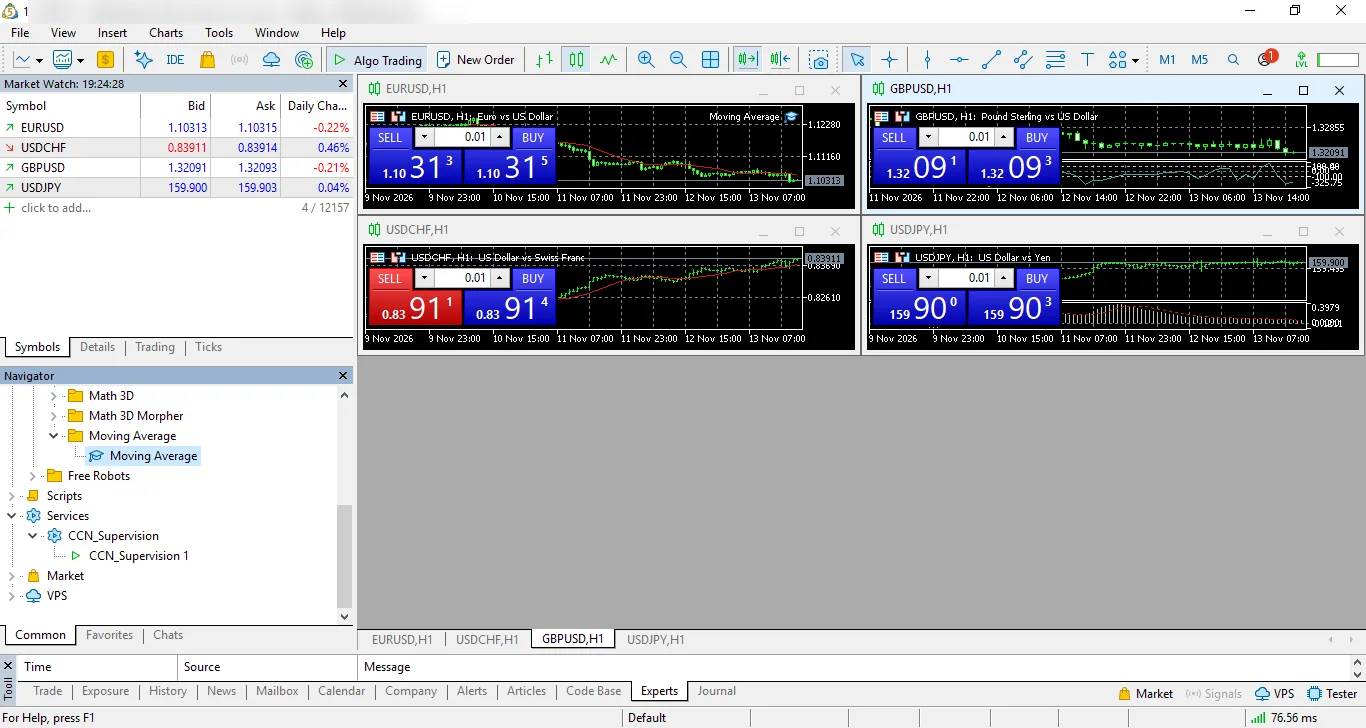
A step-by-step illustrated guide is available in the knowledge base. And if the module has a technical problem, our team steps in.
Frequently asked questions
Do I need to contact CCN Technologies for the installation?
No. Installation is fully self-service: you download your personal installer from the client area, run it on your VPS and add the service in MetaTrader 5. Everything else is automated.
What is the 1-hour intervention on the Pro plan for?
It covers the operation of CCNT Supervision itself: if the agent, the MetaTrader 5 service or the alerts have a technical problem, our team steps in within 1 hour, from 8 a.m. to 10 p.m. (Cameroon time).
Do I need a CCN Technologies VPS?
Yes. CCNT Supervision is an option of CCN Technologies Windows VPS. If you don't have a VPS yet, start by choosing a Windows VPS plan, then add monitoring.
Can CCNT Supervision place orders or change my robot?
No. It only checks the technical status of the server and MetaTrader 5. It places no orders and changes neither your robot nor your trading settings.
Does it work with MetaTrader 4?
No. The current version monitors MetaTrader 5.
When am I alerted?
When an incident lasts more than 3 minutes, then again when things are back to normal. A stop fixed faster by the automatic restart only appears in your client area history.
What happens at night?
Monitoring, automatic restart and alerts run 24/7. Our team works from 8 a.m. to 10 p.m., Cameroon time.
What if I close MetaTrader 5 on purpose?
It is restarted automatically within 1 to 2 minutes: monitoring assumes MetaTrader 5 must run permanently. For maintenance, contact our team.
How long is the history kept?
Events are kept for 180 days. When the option is cancelled, the agent and monitoring data are deleted.
Does CCNT Supervision guarantee trading gains?
No. It only guarantees that you are warned when your server or MetaTrader 5 stops working normally. Trading results depend on your strategy and the market.

Never let your robot stop without knowing it
Activate CCNT Supervision on your CCN Technologies Windows VPS, from 5,000 FCFA per month.
MetaTrader is a trademark of MetaQuotes Ltd. Telegram and WhatsApp are trademarks of their respective owners. CCN Technologies is not affiliated with any of these companies. CCNT Supervision checks the technical operation of your server: it is not investment advice and guarantees no trading result.