
Is your trading robot really running right now?
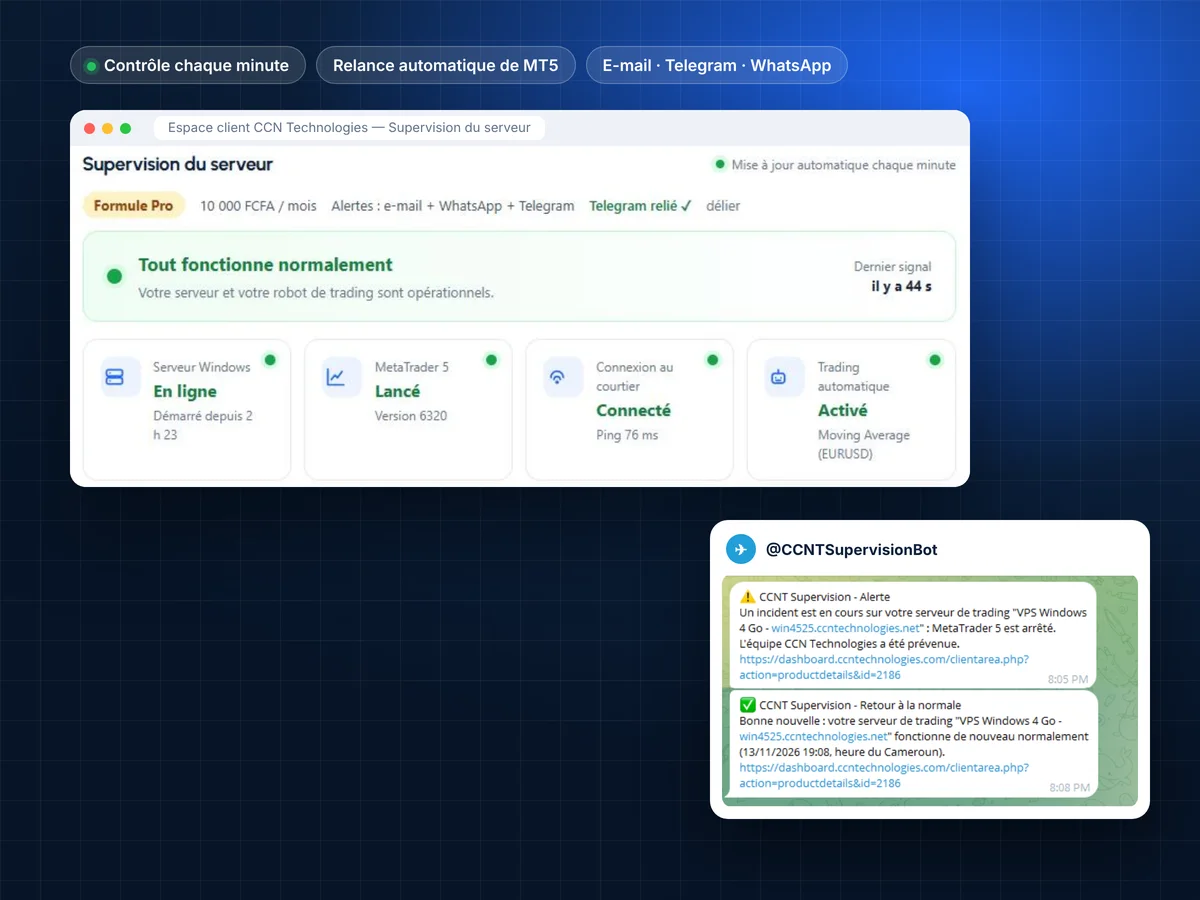
A Windows update at 3 a.m., MetaTrader 5 closing, a lost broker connection… and your robot stops without anyone noticing. CCNT VigiTrade checks your Windows VPS every minute, restarts MetaTrader 5 and alerts you right away, whoever your host is.
« Sleep well, VigiTrade watches your robot »
- Works on any Windows VPS, at CCN or elsewhere
- 100% self-service install, in 2 minutes
- Automatic MetaTrader 5 restart
- E-mail, Telegram and WhatsApp alerts
How many trades did your robot miss this week?
A trading VPS can fail in a thousand silent ways. Without monitoring, you find out too late.
Did your robot run last night?
A Windows update restarts the VPS at night: MetaTrader 5 does not restart by itself and your robot stays stopped until you next log in.
Are you still connected to your broker?
MetaTrader 5 stays open but the connection is lost: no red light on your phone, and no order goes out.
Is algorithmic trading still enabled?
One click too many or an update, and Algo Trading is switched off: the robot is attached to the chart but no longer trades.
Is your VPS overloaded?
CPU at 100%, memory or disk almost full: the server slows down and MetaTrader 5 may freeze.
How deep is the drawdown?
Your robot piles up losses while you sleep: without a threshold alert, you find out when you wake up.
How long before you notice?
Most of the time, the stop is discovered hours later, when opening Remote Desktop… after the market has moved.
CCNT VigiTrade promises no trading gains: it checks that your server and MetaTrader 5 are working, restarts what can be restarted and alerts you as soon as something is wrong.
Three steps, and your robot is never alone again
Tested in real conditions on Windows VPS: restarts, updates, MetaTrader 5 stops and alerts on every channel.
Install it yourself in 2 minutes
Download your personal installer from the client area and run it on your VPS: everything is automated. No CCN Technologies intervention, no access to your server.
Checked every minute
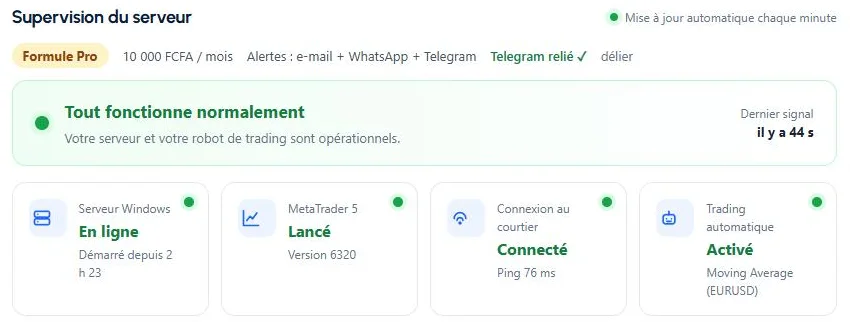
A signed Windows agent and the CCN_Supervision service in MetaTrader 5 report the technical status: server, MetaTrader 5, broker connection and automated trading.
Restart and alerts
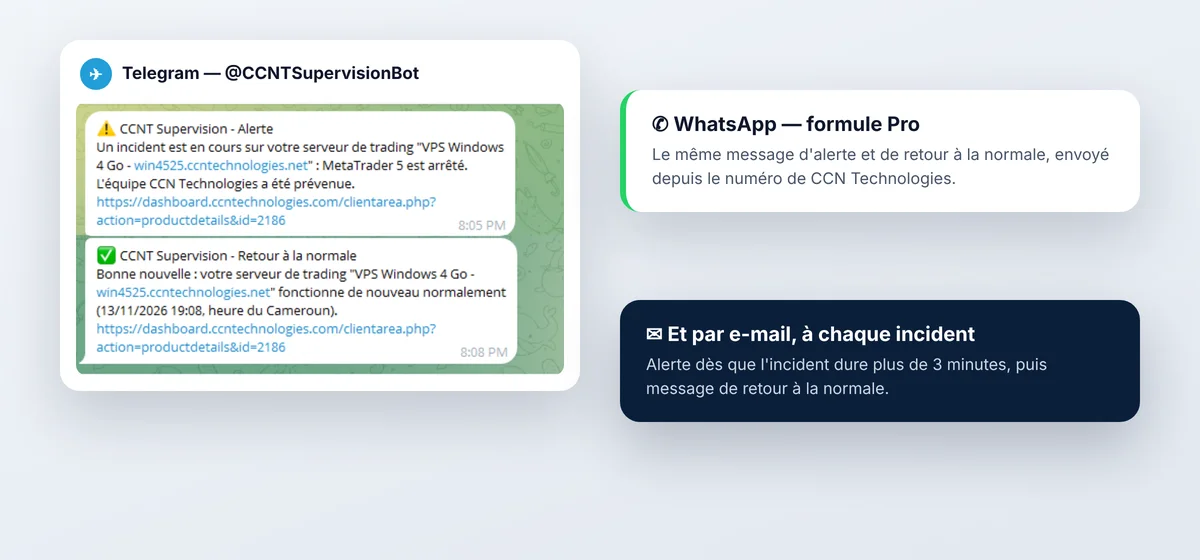
MetaTrader 5 stopped? It is restarted automatically. Incident lasting? You get an alert, then a back-to-normal message.
On your CCN VPS… or with any host
You have a CCN Technologies Windows VPS
Add VigiTrade as an option of your VPS, from 5,000 FCFA/month. On the Pro plan, our team steps in within 1 hour if the module itself has a technical issue.
Your VPS is with another host
Subscribe to VigiTrade per seat (one seat = one server), from 7,500 FCFA/month, or 1 free seat on the Watch plan. Lower prices for 3, 5 or 10 seats.
Everything that can stop your robot, checked every minute
Windows server online
A signal every minute; with no signal for 5 minutes, the server is marked offline and you are alerted.
MetaTrader 5 running
Stop detection and automatic restart, up to 3 times per hour.
Broker connection
Connected or not, with the response time (ping) in milliseconds.
Automated trading and robots
Algo Trading enabled, robots attached to charts and allowed by the broker.
Server resources
CPU, memory and disk, with a 24-hour chart; overload reported.
Updates and restarts
Pending Windows updates, restart detected, session opened and MT5 restarted automatically.
Your account (Performance plan)
Balance, equity, daily and total drawdown, daily, weekly and monthly results, with your consent.
History and availability
Your robot's availability over 30 days, 6-month event history, CSV export.
Your robot answers your questions on Telegram
Link your Telegram in one click from the client area, then ask @CCNTSupervisionBot (display name “CCNT VigiTrade”) at any time. Commands read the status and set your alerts: none of them touches your server, MetaTrader 5 or your account.
| Command | What it does | From plan |
|---|---|---|
/etat | Status of all your servers | Essential |
/incidents | Latest incidents | Essential |
/dispo | Availability over 24 h, 7 and 30 days | Essential |
/pause 2h · /reprendre | Pause alerts during maintenance | Essential |
/serveur | CPU, memory, disk, uptime | Pro |
/mt5 | Build, ping, auto trading, robots, restarts | Pro |
/silence 22-7 | No Telegram or WhatsApp at night (e-mail still sent) | Pro |
/compte · /dd | Balance, equity, daily and total drawdown | Performance |
/resultats | Daily, weekly, monthly result | Performance |
/alerte_dd 4.5 · /alerte_capital 1000 | Alert when a threshold is reached (once a day) | Performance |
/rapport quotidien | Automatic daily, weekly or monthly report | Performance |
Choose your peace of mind
Change plans whenever you like from the client area: the new plan applies at once, with nothing to reinstall. Prices in FCFA, payable by Mobile Money and our other payment methods.
| Watch | 7-day trial | Essential | Pro Most popular | Performance | |
|---|---|---|---|---|---|
| Checked every minute, automatic MT5 restart | |||||
| E-mail alert | after 10 min | after 3 min | after 3 min | after 3 min | after 3 min |
| Telegram alerts and commands | |||||
| WhatsApp alerts | 10 max. | ||||
| Full dashboard (resources, 30-day availability) | |||||
| History | 7 days | 7 days | 6 months + CSV | 6 months + CSV | 6 months + CSV |
| /serveur, /mt5, /silence commands | |||||
| Account: balance, drawdown, results | |||||
| Threshold alerts and automatic reports | |||||
| My VPS with another host | Free Order | Free once only Order | 7,500 FCFA/month Order | 12,500 FCFA/month Order | 17,500 FCFA/month Order |
| Option of my CCN VPS | Free Add to my CCN VPS | Free once only Add to my CCN VPS | 5,000 FCFA/month Add to my CCN VPS | 10,000 FCFA/month Add to my CCN VPS | 15,000 FCFA/month Add to my CCN VPS |
Several servers? Price per number of seats
For a VPS with another host. One seat = one Windows server with its own installer and key. Total price per month; annual payment = 10 months for 12.
| Plan | 1 seat | 3 seats | 5 seats | 10 seats |
|---|---|---|---|---|
| Essential | 7,500 FCFA | 19,500 FCFA | 30,000 FCFA | 50,000 FCFA |
| Pro | 12,500 FCFA | 33,000 FCFA | 52,500 FCFA | 90,000 FCFA |
| Performance | 17,500 FCFA | 46,500 FCFA | 75,000 FCFA | 130,000 FCFA |
Trial: once per client, per server and per phone number; it starts with the first signal from your server. On a CCN VPS, the Pro plan includes team intervention within 1 hour, 8 a.m. to 10 p.m. (Cameroon time), if the module itself has a technical issue, and the 99% availability commitment under its terms. On a server from another host, CCN Technologies monitors and alerts; intervention on that server is not included. A seat can move to another machine once every 30 days (“Release this seat”).
Your money and your access stay yours
- CCNT VigiTrade checks the technical operation of your server and MetaTrader 5. It places, modifies or cancels no orders.
- Your Windows passwords and trading credentials stay in Windows and MetaTrader 5: they are never read, stored or sent to CCN Technologies.
- Balance and positions sharing is off by default. You switch it on yourself in MetaTrader 5, and it is only used on the Performance plan.
- Each seat has its own key: data is signed and sent over HTTPS.
- Self-service installation: CCN Technologies does not need access to your server.
- Proprietary software by CCN Technologies, provided under a licence agreement.
100% self-service installation
You install CCNT VigiTrade yourself by following the on-screen steps.
- Requirements: a Windows VPS or server and MetaTrader 5 logged in to your account.
- In the client area, open your VigiTrade subscription and click Download the installer, from the VPS browser.
- Right-click the file › Run with PowerShell, then accept the licence agreement.
- In MetaTrader 5: Navigator › Services › Refresh, then right-click CCN_Supervision › Add Service.
- Link your Telegram in one click; WhatsApp alerts go to the number already saved in your client area.
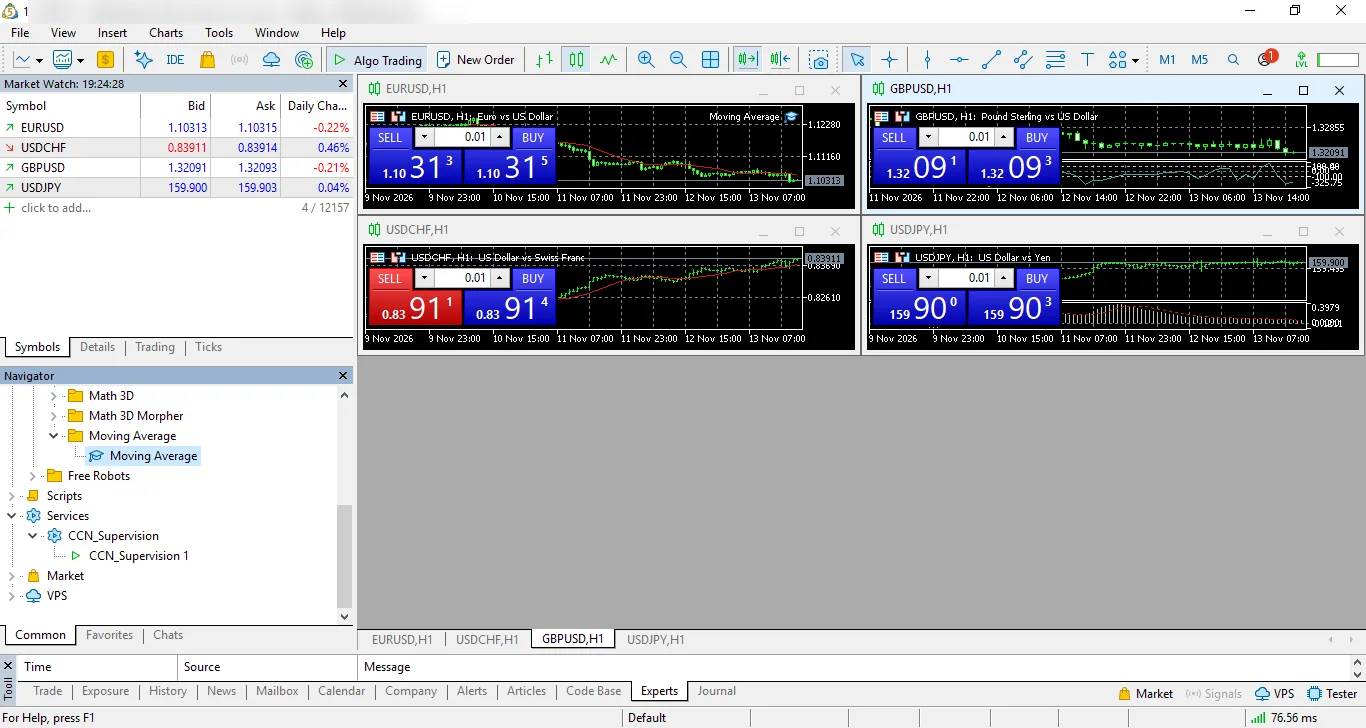
A step-by-step illustrated guide is available in the knowledge base.
Frequently asked questions
Do I need a VPS from CCN Technologies?
No. CCNT VigiTrade works on any Windows VPS or server with MetaTrader 5, whatever the host. If your VPS is with CCN Technologies, add it as an option; otherwise, take a per-seat subscription.
Is the Watch plan really free?
Yes, for 1 seat with no time limit: checks every minute, automatic MetaTrader 5 restart, e-mail alert after 10 minutes of incident and 7-day history.
How does the 7-day trial work?
It gives all Pro features for 7 days, starting with the first signal from your server. It is offered once per client, per server and per number. At the end, monitoring pauses: choose a plan and it resumes at once, with nothing to reinstall.
Do I need to reinstall if I change plans?
No. The plan is decided server-side: upgrade or downgrade, the installed agent keeps running and the new plan applies immediately.
Can CCNT VigiTrade place orders or change my robot?
No. It checks the technical status and, on the Performance plan with your consent, reads balance and equity. It places no orders and changes neither your robot nor your trading settings.
When am I alerted?
When an incident lasts more than 3 minutes (10 minutes on Watch), then again when things are back to normal. A stop fixed faster by the automatic restart only shows in the history. You can pause alerts during maintenance with /pause.
Can I monitor several servers?
Yes: choose 3, 5 or 10 seats at a lower price. Each seat has its own installer and key, and shows in a tab of your client area.
Does it work with MetaTrader 4?
No. The current version monitors MetaTrader 5.
How long is history kept?
180 days for events (7 days visible on Watch and during the trial). On cancellation, the agent and data are deleted.
Does CCNT VigiTrade guarantee trading gains?
No. It warns you when your server or MetaTrader 5 stops working normally, and reports on your account on the Performance plan. Trading results depend on your strategy and the market.

Never let your robot stop without knowing it
Start free with the Watch plan, or try all Pro features for 7 days.
MetaTrader is a trademark of MetaQuotes Ltd. Telegram and WhatsApp are trademarks of their respective owners. CCN Technologies is not affiliated with any of these companies. CCNT VigiTrade checks the technical operation of your server: it is not investment advice and guarantees no trading results.